We scan your book
You get ebook and print-ready
files with full cover design
Ready to publish on Amazon

Book Formatting
Services
Looking for book formatting? Our team of expert
formatters will make your book shine.
Get in touch now!
Starting at $49.00

48 Hour Delivery

Unlimited Revisions

Get Accepted To Amazon. Fast.
Get in Touch
Sue Anne Dunlevie
"Thanks so much. What a great job you did! I will recommend you to my friends"

We have converted 1000s
of eBooks since 2013

We design your eBook according to the strict Amazon KDP guidelines.

Your eBook will run flawlessly on Kindle, iPad, and Android.

You will be accepted by Amazon, instantly.

Unlimited revisions. Your satisfaction is guaranteed.

Free eBook cover made from stock images with author's name and title information!

We will deliver your properly formatted file to you within 48 hours.
Book formatting services provide authors with several key benefits. First off, they ensure that your manuscript is properly formatted according to industry standards. This makes your book look more professional and increases its chances of being accepted by publishers or self-publishing platforms such as Amazon KDP or IngramSpark. Additionally, proper formatting can help reduce production costs since errors in design require additional time and money to correct later on in the production cycle.
Finally, using a professional service ensures that your book is expertly designed to attract readers’ attention without compromising readability or flow. Book formatting is the process of taking your manuscript and turning it into an attractive, reader-friendly document that can be printed or published digitally. It involves making sure that the text is properly aligned, margins are consistent throughout the document, font size and style are appropriate for the genre, and images or illustrations are correctly placed in the document.
This page is the service overview; the deeper production tracks are book formatting for interiors, ebook formatting for reflowable EPUB, KDP paperback formatting for Amazon print, and IngramSpark formatting for bookstore distribution.
By Nick Caya, Word-2-Kindle founder — content last reviewed May 2026.
What “Book Formatting Services” Actually Means
Book formatting is the production step between a finished manuscript and a file a retailer will accept. The job is split across two production tracks that share almost nothing. The print track produces a print-ready PDF, with margins, gutter, bleed, hyphenation, page numbers, running heads, and a cover spine sized to the printer’s spec sheet. The digital track produces a reflowable EPUB, with semantic markup, a navigable table of contents, scalable typography, and clean style metadata that survives Kindle, Apple Books, and Kobo conversion. A book that needs both formats needs both tracks run independently — not one file converted to the other.
EPUB for Kindle, Apple Books, Kobo, and Google Play
EPUB 3 is the digital standard. Each chapter is its own XHTML document; styling lives in a single CSS file; the spine is declared in content.opf; and the navigation tree is declared in nav.xhtml. Kindle ingests EPUB and converts to KF8/AZW3 internally, so a clean EPUB is the right source for KDP. Apple Books rejects files with broken nav, embedded fonts that miss licensing flags, or images that exceed 4 megapixels. Kobo’s checker is stricter on accessibility metadata than KDP. Amazon ebook formatting covers the KDP-specific tuning; uploading to KDP is the last-mile step.
Print PDF for KDP Print and IngramSpark
Print is an exact-measurement craft. KDP Print accepts a 6×9 trim with a 0.125″ bleed and a gutter that grows with page count. IngramSpark accepts a wider range of trims (5×8 through 8.5×11) and requires a separate cover PDF with a barcode placeholder, plus an exact spine width derived from page count and paper weight. Submitting a KDP-built cover to IngramSpark, or vice versa, is the most common reason a print proof comes back wrong. KDP paperback formatting and IngramSpark formatting handle each side; professional typesetting sits underneath both.
Fixed-layout vs reflowable — pick the right format first
Reflowable EPUB lets the reader change font size and line height; the layout adapts. Fixed-layout EPUB pins every word to a coordinate, the way a magazine does. Children’s picture books, photo books, cookbooks with full-bleed photography, and graphic-heavy non-fiction need fixed-layout formatting. Reflowable is wrong for these because Amazon’s converter will collapse multi-column pages into a single scrolling stream and orphan captions from their images. The decision is made before the formatting work starts, not after.
Why DIY Formatting Falls Over at Scale
Word and Google Docs export EPUBs and PDFs that look right on screen and fail at retailer ingestion. The most common silent failures: the table of contents links jump to the wrong chapter because Word built it from style names rather than anchored bookmarks; embedded images blow the file size past Amazon’s 50 MB ceiling because the source DPI was 600 instead of 300; smart-quote pairs are mismatched because Word’s autocorrect ran inside code blocks; and the cover spine is off by 4 points because the calculator used a 50-pound paper weight when IngramSpark printed on 70-pound. These are not visible until the proof arrives, and the proof cycle is what costs authors weeks. A professional formatter runs the file through Kindle Previewer, Adobe Acrobat preflight, and IngramSpark’s validator before the retailer sees it.
What Word-2-Kindle Delivers
- Reflowable EPUB for Kindle, Apple Books, Kobo, and Google Play — semantic chapters, navigable ToC, embedded fonts where licensed, image optimization to retailer ceilings.
- Print-ready PDF for KDP Print and IngramSpark — trim, bleed, gutter, spine width calculated from final page count, running heads, drop caps, hyphenation passes, and a separate cover PDF with barcode placeholder.
- Fixed-layout EPUB for picture books, cookbooks, and photo-heavy titles — one XHTML document per spread, embedded fonts, region-specific image scaling.
- Source files returned — you keep the InDesign IDML and Word source so the next edition can be revised in-house.
Turnaround is 48 hours for a standard ebook (under 100,000 words, no inline images), 4–6 business days for a paperback, and 5–7 days for a fully illustrated fixed-layout title. Unlimited revisions are included for the first 30 days after delivery; we keep working until KDP and IngramSpark both accept the files.
Frequently Asked Questions About Book Formatting Services
What file should I send you to start?
A Word document (.docx) is the preferred source for both ebook and print tracks. Google Docs exports work too. We do not start from PDFs — PDF text reflow is unreliable and we’d be undoing your formatting before redoing it.
Do you handle the cover too?
For print only: we calculate the spine width from your final page count and produce a cover PDF that fits KDP or IngramSpark’s template. The artwork itself comes from our cover design service or from a designer you supply.
Can the same file be uploaded to KDP and IngramSpark?
Ebook: yes — one EPUB works for KDP, Apple Books, Kobo, and Google Play. Print: no. KDP Print and IngramSpark use different cover templates and different paper weights, so the cover PDF is platform-specific. The interior PDF is usually portable, with bleed and trim re-checked per platform.
How is fixed-layout pricing different from reflowable?
Fixed-layout requires per-page composition rather than per-document styling, so the unit of work is closer to typesetting a print book than to converting an ebook. Pricing scales with page count and complexity rather than word count.
What happens when KDP rejects the upload?
We rerun the file through the validator that flagged it, fix the underlying issue (missing language metadata, oversized images, broken cross-references), and re-upload at no charge. Rejection cycles are part of the work, not a separate billable item.
Services & Pricing
What is eBook formatting?
Ebook formatting is the preparation of a digital file to ensure that it meets the publisher’s requirements and is an enjoyable reading experience.
Why do I need my eBook formatted?
Professional eBook formatting is required to get proper chapter tagging, a clickable table of contents, and a flexible layout compatible with all e-readers.
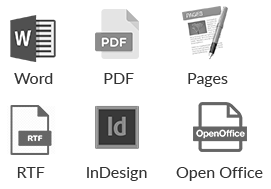
Formats We Accept
We can also try using other formats
Revisions
Unlimited free revisions for two weeks after delivery. After this date additional revisions request cost a flat $19 for any reasonable amount of revisions.
Output Formats
We provide both Mobi and ePub versions ready for publishing at Amazon, Nook, Smashword, Apple, etc.

48 Hour Delivery

Unlimited Revisions

Get Accepted To Amazon. Fast.

Book Cover Design
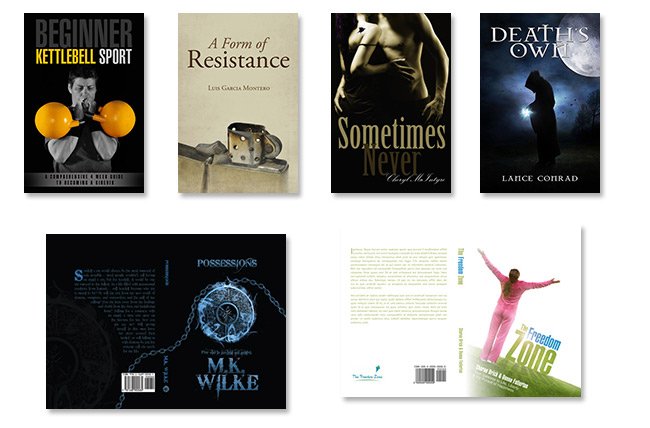
A selection of our recent ebook and print work
An eye-catching, professional cover design is one of the most important keys to the success of your ebook.
Most online retailers will display a very small thumbnail of your cover on their site,
it is vital that your cover works well both as a small image and as a bigger traditional cover.
Basic eBook Cover Design
FREE
FREE with any eBook conversion package. A basic cover is made from stock images with the author’s name and title information
Short Non-Fiction
$99
Premium cover design involves photo manipulation to create an eye-catching cover that really suits your eBook.
Kids’ Books & Cookbooks
$199
This package includes premium custom cover creation with a back and spine for
book printing.
Services & Pricing
What is eBook formatting?
Ebook formatting is the preparation of a digital file to ensure that it meets the publisher’s requirements and is an enjoyable reading experience.
Why do I need my eBook formatted?
Professional eBook formatting is required to get proper chapter tagging, a clickable table of contents, and a flexible layout compatible with all e-readers.
Formats We Accept
We can also try using other formats
Revisions
Unlimited free revisions for two weeks after delivery. After this date additional revisions request cost a flat $19 for any reasonable amount of revisions.
Output Formats
We provide both Mobi and ePub versions ready for publishing at Amazon, Nook, Smashword, Apple, etc.

48 Hour Delivery

Unlimited Revisions

Get Accepted To Amazon. Fast.

Book Cover Design
A selection of our recent ebook and print work
An eye-catching, professional cover design is one of the most important keys to the success of your ebook.
Most online retailers will display a very small thumbnail of your cover on their site,
it is vital that your cover works well both as a small image and as a bigger traditional cover.
Basic eBook Cover Design
FREE
FREE with any eBook conversion package. A basic cover is made from stock images with the author’s name and title information
Short Non-Fiction
$99
Premium cover design involves photo manipulation to create an eye-catching cover that really suits your eBook.
Kids’ Books & Cookbooks
$199
This package includes premium custom cover creation with a back and spine for
book printing.
Book to eBook Package
$199
We scan your book
You get a Kindle-ready ebook file
and an ebook-ready cover design.
Up to 200 pages of normal text.
Extra charge of $1/page over this
Book to Print Formatting
$299
We scan your book
Your get a print-ready PDF file
with a full jacket design
for print on demand services
like Amazon’s CreateSpace
Book to eBook & Print
$399
Frequently Asked Questions
1000s of Happy Customers
We are proud to have some of the happiest customers in the business.
Take a look at some of the feedback our customers have left for us.
Still Have Some Questions
Word-2-Kindle Guarantee

48 Hour Delivery

Unlimited Revisions

Get Accepted To Amazon. Fast.