We scan your book
You get ebook and print-ready
files with full cover design
Ready to publish on Amazon

Kindle Book
Formatting
Looking to Publish on Kindle? Our team
of expert book formatters will make your book shine.
We make publishing easy. Get in touch now!
Starting at $49.00

48 Hour Delivery

Unlimited Revisions

Get Accepted To Amazon. Fast.
Get in Touch
Sue Anne Dunlevie
"Thanks so much. What a great job you did! I will recommend you to my friends"

We have converted 1000s
of eBooks since 2013

We design your eBook according to the strict Amazon KDP guidelines.

Your eBook will run flawlessly on Kindle, iPad, and Android.

You will be accepted by Amazon, instantly.

Unlimited revisions. Your satisfaction is guaranteed.

Free eBook cover made from stock images with author's name and title information!

We will deliver your properly formatted file to you within 48 hours.
Kindle Book Formatting
Getting your book ready for Kindle publishing requires specific formatting to meet Amazon’s requirements. Our Kindle book formatting service will professionally format your manuscript for the Kindle platform. We deliver print-ready PDF files formatted to KDP standards. This includes styling the document for digital distribution, adding a linked table of contents, optimizing images, and converting the file for Kindle devices and Kindle apps. Our Kindle experts manually format each book to avoid errors that automated software can cause. We specialize in both fiction and nonfiction Kindle formatting. From memoirs to cookbooks, our team will make your book look polished and professional. With our Kindle formatting service, you can be confident your book will meet Amazon’s technical guidelines. Our affordable rates beat Do-It-Yourself formatting. Let us handle the technical details so you can focus on writing and marketing. With over 10 years of experience, we’ve formatted thousands of books for satisfied indie authors and publishers. Contact us today for a free sample and quote.
What Kindle Book Formatting Actually Covers
Kindle book formatting is the discipline of producing an EPUB3 source file that survives KDP’s conversion workflow and renders as a clean KFX on every current Kindle device and app. It is a narrower problem than generic ebook formatting. EPUB3 for Apple Books, Kobo, and Google Play assumes the storefront ships your file as-is; Kindle does not. KDP ingests your EPUB3 (or DOCX, or a KPF exported from Kindle Create) and re-encodes it into Amazon’s proprietary container before any reader sees a page.
That conversion step is where Kindle-specific quirks live: the KFX format introduced in 2015, Bookerly as the default typeface on E Ink hardware, and Kindle Previewer 3 as the only validator whose verdict matches what KDP will actually do to your file. A book that passes EPUBCheck cleanly can still arrive on a Paperwhite with collapsed drop caps, substituted fonts, or a navigation document that no longer matches the printed table of contents. The work below is what separates the two outcomes.
KFX, KF8, AZW3: what each device actually reads
- KFX — the modern format introduced in 2015. Served to all current Kindle devices and Kindle apps on iOS, Android, Mac, and Windows. Supports enhanced typography, improved page rendering, and Amazon’s Bookerly hinting.
- KF8 (AZW3) — the format Kindles served from 2011 to 2015. Still accepts CSS, but a narrower subset than EPUB3, and KDP only generates it as a fallback for older hardware.
- MOBI — the legacy format, retired for new KDP uploads in August 2022. Pre-2014 Kindles may still receive a MOBI fallback when one is available.
Authors upload EPUB3, DOCX, or KPF to KDP. KDP converts that source into KFX for new devices, KF8 for the 2011–2015 generation, and a MOBI fallback where one is needed. The formatter’s task is to deliver a source file that converts cleanly into all three without visible regressions.
What Kindle’s converter strips or alters
- Drop caps — the float-left CSS pattern that works in Apple Books often collapses to a plain capital letter on older Kindle hardware. Use the span class approach Amazon documents in the Kindle Publishing Guidelines.
- Custom fonts — KDP permits embedded fonts in EPUB3 uploads, but Paperwhite and Oasis frequently substitute the reader’s chosen system font (Bookerly, Amazon Ember, Helvetica) regardless.
- Complex CSS — transforms, animations, fixed positioning, and viewport units are silently dropped during conversion.
- Page-break-after on inline elements — ignored. Apply page-break-before to the heading’s block-level container instead.
- Embedded JavaScript — rejected outright at the OPF validation step.
Kindle Previewer 3 warnings, ranked by severity
Every Kindle file should pass through Kindle Previewer 3 before it reaches KDP. The tool produces four categories of message, and they are not equally urgent:
- Blockers — broken navigation document, missing OPF manifest entries, unsupported image formats. These prevent KDP from generating a valid KFX and must be resolved before upload.
- Image-DPI warnings — flagged when raster images fall below 300 DPI at their displayed size. Cosmetic, but visible on Paperwhite and Scribe screens.
- Font-substitution warnings — usually safe to ignore. Bookerly is a competent fallback for body text, and most readers override embedded fonts anyway.
- Navigation mismatch — the printed table of contents does not match the nav doc or NCX. Resolve this; without a valid nav doc readers cannot jump between chapters using the Kindle menu.
Why Authors Choose Kindle-Specific Formatting
- One format, every Kindle device — the same source renders correctly on Paperwhite, Oasis, Scribe, Fire tablets, and the Kindle apps without per-device tuning.
- Previewer-clean output — files arrive at KDP with no blocker warnings, so the title goes live within Amazon’s standard 72-hour review window.
- Working navigation — the nav doc, printed ToC, and chapter starts agree, so the Kindle menu jumps to the right place every time.
- Drop caps that survive conversion — first-paragraph styling renders on KFX devices instead of collapsing to plain capitals on the older fleet.
- Predictable typography — line height, paragraph indent, and chapter spacing match Bookerly’s metrics rather than fighting them.
Kindle formatting branches by content type. Image-heavy titles (children’s, photo books, cookbooks) need fixed-layout EPUB rather than reflowable. The KDP upload step handles validation. Authors who want a print companion need KDP paperback formatting; professional typesetting sits underneath the print interior. Specialty categories like cookbooks have their own composition rules.
Frequently Asked Questions About Kindle Book Formatting
Do I upload EPUB3 or MOBI to KDP in 2026?
EPUB3. Amazon retired MOBI uploads in August 2022. KDP also accepts DOCX and KPF files exported from Kindle Create, but EPUB3 gives the formatter the most control over how the final KFX renders.
Will my embedded font actually display on a Paperwhite?
Sometimes. KDP permits embedded fonts in the EPUB3 manifest, and they survive the KFX conversion. However, Kindle E Ink devices give the reader a font picker that overrides embedded choices, and Bookerly is the default for most users. Embed fonts for headings and display use; assume body text will render in Bookerly.
What is the difference between Kindle Previewer 3 and EPUBCheck?
EPUBCheck validates against the EPUB3 specification. Kindle Previewer 3 simulates KDP’s actual conversion to KFX and KF8, then renders the result on emulated Kindle devices. A file can pass EPUBCheck and still produce broken pages on a Paperwhite, which is why Previewer 3 is the relevant validator for Kindle.
Does Kindle generate the table of contents automatically?
Kindle reads the nav doc declared in the EPUB3 OPF and uses it for the menu-driven Go To panel. A separate printed ToC inside the manuscript serves the reader who flips to the front of the book. Both should exist, both should match, and the nav doc must use the EPUB3 nav element rather than a legacy NCX alone.
Can I use the same EPUB3 file on Kindle, Apple Books, and Kobo?
The same source file can be uploaded to all three, but it will not render identically. Apple Books and Kobo serve the EPUB3 directly and respect more CSS. Kindle re-encodes to KFX and strips a documented subset. A file engineered for Kindle stays inside that subset deliberately, which is why a single-source EPUB3 often looks plainer on Kindle than the same file does on Apple Books.
Services & Pricing
What is eBook formatting?
Ebook formatting is the preparation of a digital file to ensure that it meets the publisher’s requirements and is an enjoyable reading experience.
Why do I need my eBook formatted?
Professional eBook formatting is required to get proper chapter tagging, a clickable table of contents, and a flexible layout compatible with all e-readers.
Formats We Accept
We can also try using other formats
Revisions
Unlimited free revisions for two weeks after delivery. After this date additional revisions request cost a flat $19 for any reasonable amount of revisions.
Output Formats
We provide both Mobi and ePub versions ready for publishing at Amazon, Nook, Smashword, Apple, etc.

48 Hour Delivery

Unlimited Revisions

Get Accepted To Amazon. Fast.

Book Cover Design
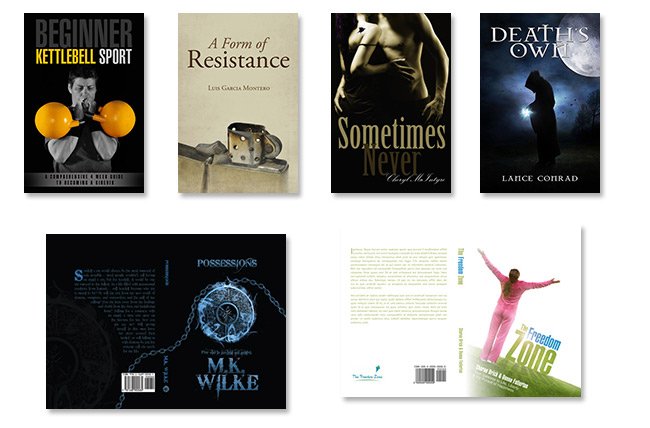
A selection of our recent ebook and print work
An eye-catching, professional cover design is one of the most important keys to the success of your ebook.
Most online retailers will display a very small thumbnail of your cover on their site,
it is vital that your cover works well both as a small image and as a bigger traditional cover.
Basic eBook Cover Design
FREE
FREE with any eBook conversion package. A basic cover is made from stock images with the author’s name and title information
Short Non-Fiction
$99
Premium cover design involves photo manipulation to create an eye-catching cover that really suits your eBook.
Kids’ Books & Cookbooks
$199
This package includes premium custom cover creation with a back and spine for
book printing.
Services & Pricing
What is eBook formatting?
Ebook formatting is the preparation of a digital file to ensure that it meets the publisher’s requirements and is an enjoyable reading experience.
Why do I need my eBook formatted?
Professional eBook formatting is required to get proper chapter tagging, a clickable table of contents, and a flexible layout compatible with all e-readers.
Formats We Accept
We can also try using other formats
Revisions
Unlimited free revisions for two weeks after delivery. After this date additional revisions request cost a flat $19 for any reasonable amount of revisions.
Output Formats
We provide both Mobi and ePub versions ready for publishing at Amazon, Nook, Smashword, Apple, etc.

48 Hour Delivery

Unlimited Revisions

Get Accepted To Amazon. Fast.

Book Cover Design
A selection of our recent ebook and print work
An eye-catching, professional cover design is one of the most important keys to the success of your ebook.
Most online retailers will display a very small thumbnail of your cover on their site,
it is vital that your cover works well both as a small image and as a bigger traditional cover.
Basic eBook Cover Design
FREE
FREE with any eBook conversion package. A basic cover is made from stock images with the author’s name and title information
Short Non-Fiction
$99
Premium cover design involves photo manipulation to create an eye-catching cover that really suits your eBook.
Kids’ Books & Cookbooks
$199
This package includes premium custom cover creation with a back and spine for
book printing.
Book to eBook Package
$199
We scan your book
You get a Kindle-ready ebook file
and an ebook-ready cover design.
Up to 200 pages of normal text.
Extra charge of $1/page over this
Book to Print Formatting
$299
We scan your book
Your get a print-ready PDF file
with a full jacket design
for print on demand services
like Amazon’s CreateSpace
Book to eBook & Print
$399
Frequently Asked Questions
Kindle Book formatting is a process that prepares and converts your manuscript into a digital file compatible with Amazon Kindle’s eBook publishing platform. It optimizes your content for readability across various digital devices, turning your Word documents into professional eBooks. It handles everything from paragraph styling and table of contents creation to embedding images and hyperlinks, tailoring the layout to be easily navigable and user-friendly on Kindle devices.
Word-2-Kindle enhances your ebook by ensuring that it adheres to Amazon’s strict formatting guidelines. We focus on details like clickable Table of Contents, appropriate page breaks, optimized image insertion, proper alignment and chapter starts. We ensure your book has a professional look and feel that enhances readability on Kindle devices. Our team helps eliminate distracting formatting inconsistencies, allowing readers to concentrate on your work without interruptions.
Word-2-Kindle is an expert in providing high-quality Kindle Book formatting services. We have a deep understanding of Amazon’s guidelines and are proficient at optimizing your work for the Kindle platform. Our commitment to providing a streamlined and efficient service means you can focus on writing, while we take care of the technical details. We deliver professionally formatted books, enhancing your book’s presentation and reader experience.
Yes, Word-2-Kindle is equipped to tackle complex formatting requirements. Whether you have tables, charts, graphs, footnotes, or images in your manuscript, our team of experts will ensure these elements are correctly formatted for the Kindle platform. We strive to enhance each aspect of your book, keeping the original spirit of your material intact while making it suitable for a digital reading experience.
The formatting process duration at Word-2-Kindle is largely dependent on the complexity and length of your manuscript. However, we understand the value of time in publishing, so we usually deliver a perfectly formatted Kindle book within 5-7 business days. If your book is relatively straightforward, it might even be done sooner! We believe in quality over speed, and rest assured, we make every second count!
1000s of Happy Customers
We are proud to have some of the happiest customers in the business.
Take a look at some of the feedback our customers have left for us.
Still Have Some Questions
Word-2-Kindle Guarantee

48 Hour Delivery

Unlimited Revisions

Get Accepted To Amazon. Fast.